Start here
Plans & limits
There’s nothing to set up to start. YouTube Discovery search, outlier scoring, and transcripts are free for everyoneand keyless — they read from our own index, so you just type a keyword and go.
The AI features— YouTube Maker (hooks, intros, titles) and Thumbnail Studio — run on managed keyswith a monthly allowance on paid plans. You don’t configure anything; we supply the keys. Track your live usage any time under Settings → Usage this month.
- Free— unlimited keyless search, 10 live “fresh pulls” a month for long-tail queries, 2 Maker projects, 20 saved videos. AI text and thumbnails on Free need your own key (below) or a paid plan.
- Starter ($29/mo)— 100 AI generations and 50 thumbnails a month on our keys, 250 fresh pulls, 10 projects, 200 saved videos.
- Pro ($49/mo)— 1,000 AI generations and 500 thumbnails a month, 1,500 fresh pulls, unlimited projects and saved videos.
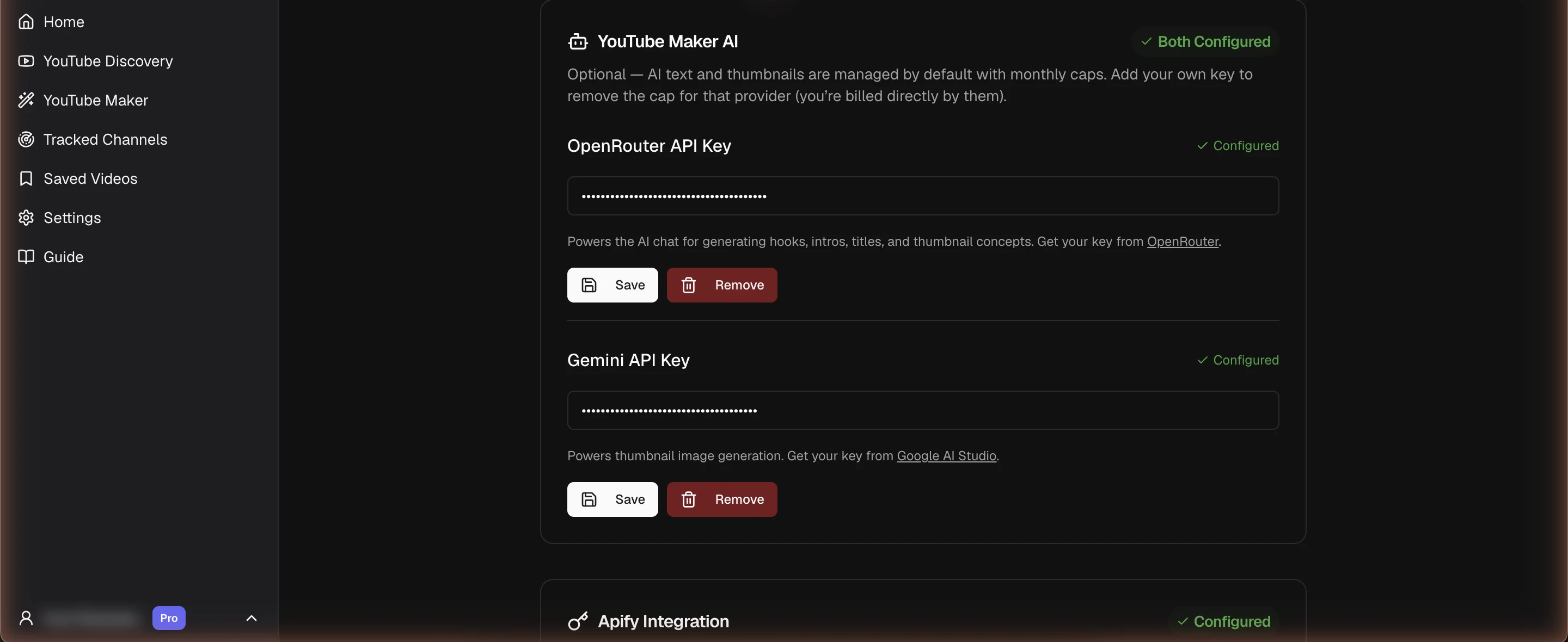
- 1Open Settings from the sidebar — see your live usage under "Usage this month."
- 2All keys are optional: add OpenRouter (AI text) or Gemini (thumbnails) to go unlimited on Free, or past the caps on paid plans.
- 3Add Apify to make long-tail "fresh pulls" unlimited. Transcripts are managed — no key needed.
Advanced: bring your own key
Want to run on your own provider account, or go past the managed caps? Add a key in Settings and that provider becomes uncapped— you’re billed directly by the provider at their rates. It’s the only way to get truly unlimited AI (Pro + your own key), and it works on any plan, including Free.
- OpenRouter — uncaps YouTube Maker’s AI text. Key from OpenRouter.
- Gemini— uncaps Thumbnail Studio and the “Similar thumbnails” visual search. Key from Google AI Studio.
- Apify— uncaps live “fresh pulls” for long-tail searches not yet in our index. Free key from the Apify Console.
- RapidAPI— optional; transcripts are managed by default. Add your own key only if you prefer to use it.
Why this matters
Orientation
Your first 10 minutes
A path that lights up every major feature in one short session:
- Search a niche you care about in Discovery (e.g. personal finance budgeting). Results default to Past 6 months, sorted by outlier score.
- Glance at the multiplier badges(e.g. 23×). A 🔥 flag means the video is breaking out right now.
- Hit Get true scoresto measure visible channels against their own median — exact scores, cached after the first run.
- On a card you like, open Similar ▾ → Similar titles to see the same concept across YouTube.
- From a result, Similar ▾ → Use thumbnail in Studio seeds a Thumbnail Studio project with that thumbnail as a reference.
- Spot a creator worth following? Click Track, then watch Tracked Channels for their next breakout.
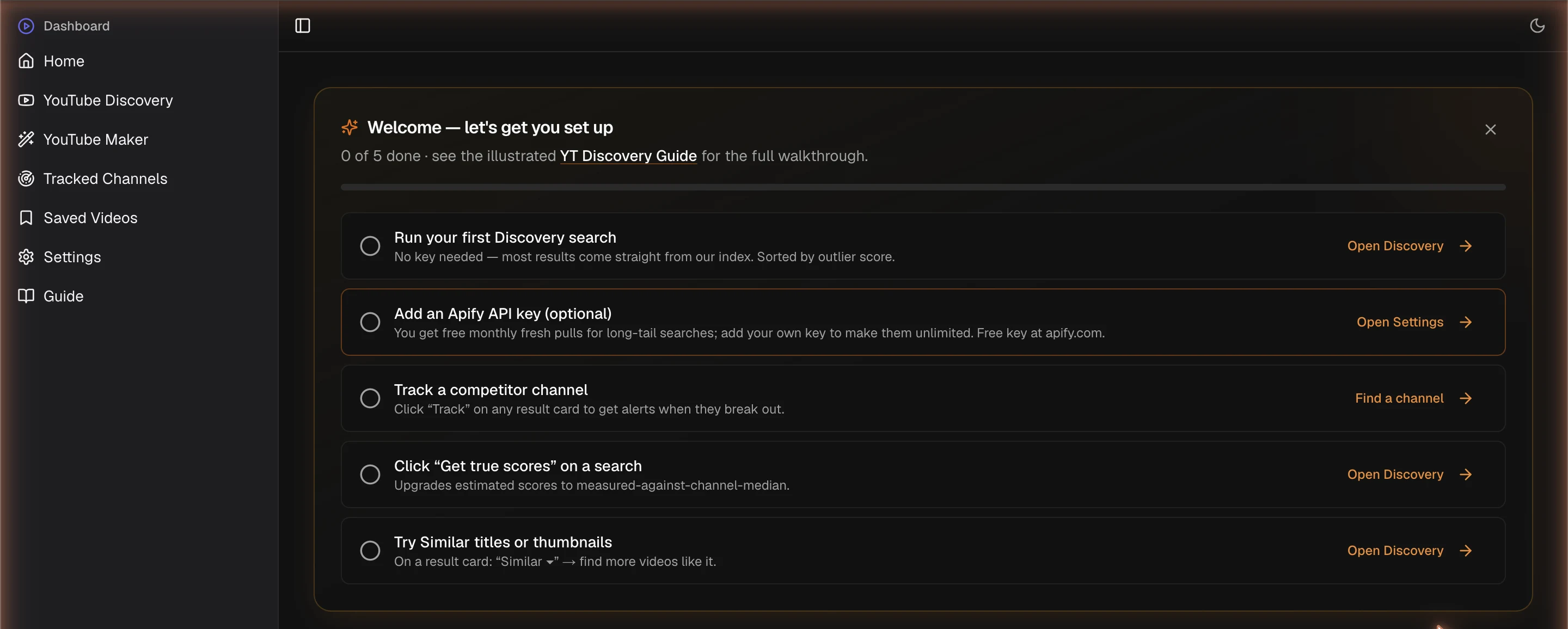
- 1Land on the dashboard after signing in.
- 2Work the checklist top to bottom; it tracks your progress.
- 3It disappears once all five steps are done.
Feature
YouTube Discovery
Search any keyword. Pick an Uploaded window (defaults to Past 6 months) — this is pushed into the search itself, so the pool is fresh rather than filtered after the fact.

- 1Type a niche keyword (e.g. "personal finance budgeting").
- 2Set the Uploaded window — defaults to Past 6 months.
- 3Search. Every search is autosaved to Recent searches.
Results sort by outlier scoreby default. Every search is autosaved — pull it back from Recent searches without re-running it.
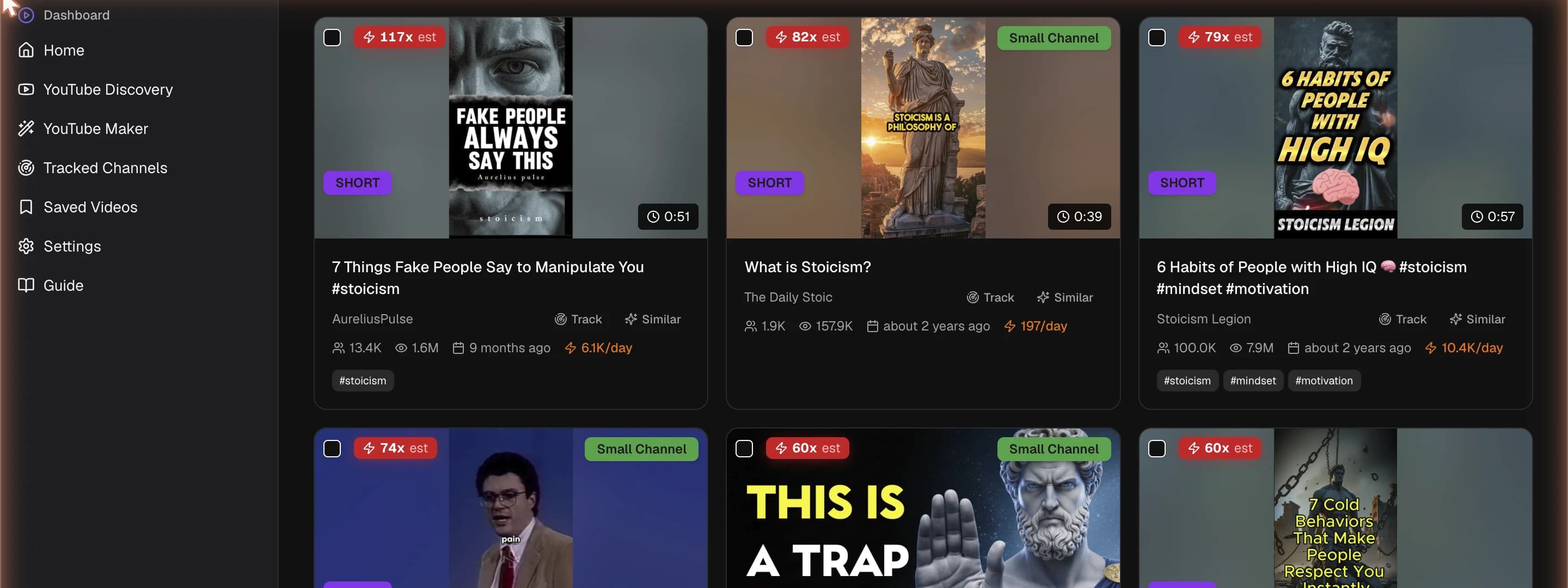
- 1Scan the multiplier badges (e.g. 23×) — higher means it beat its channel harder.
- 2🔥 marks videos breaking out right now.
- 3Each card has Track, Similar ▾, and Save actions.
Live filters narrow what’s shown without touching the underlying search:
- Outlier tier— Above avg, Strong, Viral, or 🔥 Breakouts only.
- Sort— Outlier score, Velocity, Total views, or Most recent.
- Min views, Max subscribers, video type (Shorts vs Regular), and date range.

- 1Filter by outlier tier: Above avg, Strong, Viral, or 🔥 Breakouts only.
- 2Sort by Outlier, Velocity, Total views, or Recent.
- 3Set Min Views, Max Subscribers, video type, and date range.
Why this matters
The engine
Outlier scoring
Every card shows two numbers and a basis:
- Multiplier(e.g. 23×) — how far the video beats its channel’s typical performance. Color codes from amber (above average) through to red (viral).
- Velocity(e.g. 4.2K/day) — views per day since upload. High velocity on a recent video is the strongest possible signal.
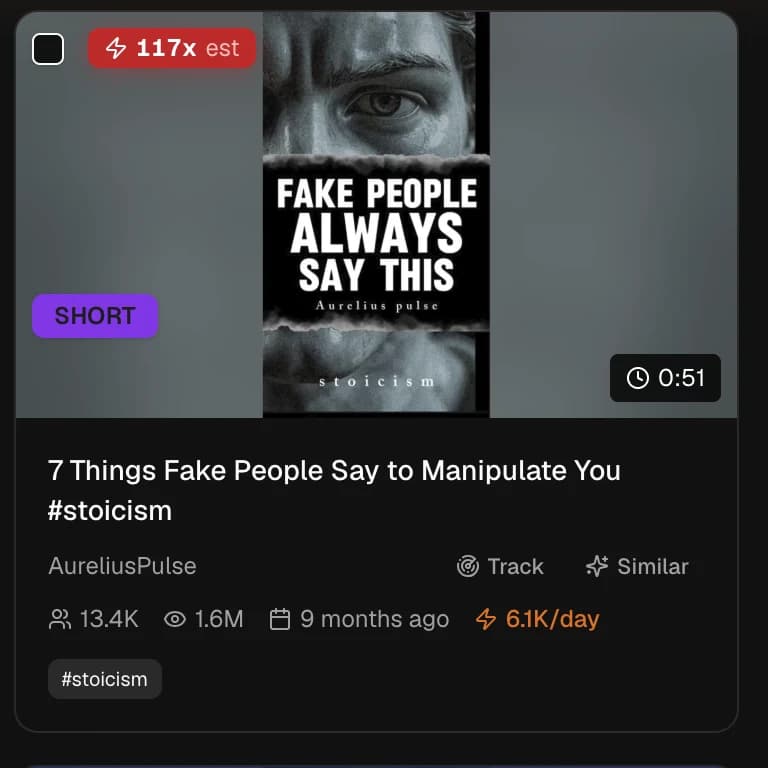
- 1Multiplier badge — how far the video beats its channel's typical video.
- 2Velocity — views per day since upload; momentum right now.
- 3Basis — 'est' (subscriber proxy) upgrades to a true score after Get true scores.
The badge shows which basis the score uses:
- est— estimated from the channel’s subscriber count (fast, free, available immediately). Tiers: Above 3×, Strong 10×, Viral 50×.
- True score (no est) — measured against the channel’s own median recent upload. Tiers: Above 2×, Strong 5×, Viral 10× (stricter, because the true median is lower than the subscriber proxy).
A 🔥 breakoutis the money signal: published within 60 days, clearing a real multiplier (≥2× on channel basis, ≥5× on subscriber basis), and still pulling ≥1,000 views/day. Click Get true scores to upgrade visible cards from estimated to measured.
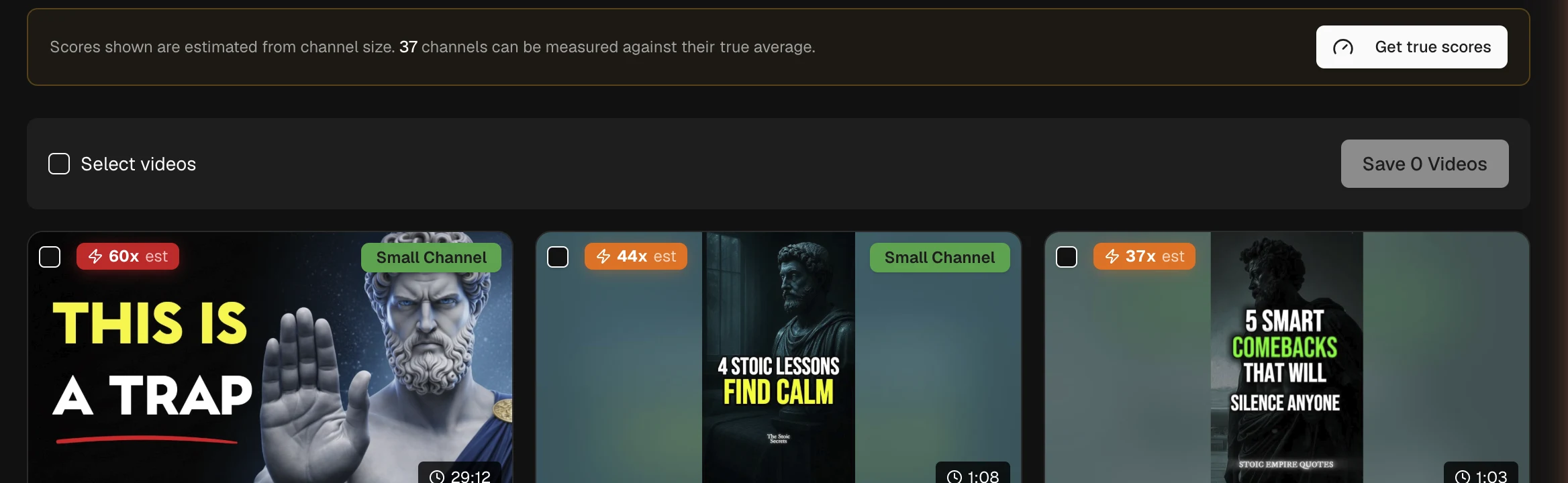
- 1Click Get true scores above the results.
- 2It measures visible channels against their own recent-upload median.
- 3Scores upgrade in place and are cached for next time.
Why this matters
Feature
Tracked Channels
Hit Trackon any card to follow a channel. A scan runs every six hours; when a tracked channel posts a video that beats its baseline by ≥3× in the last 30 days, you get an alert — with the sidebar showing an unseen-count badge.
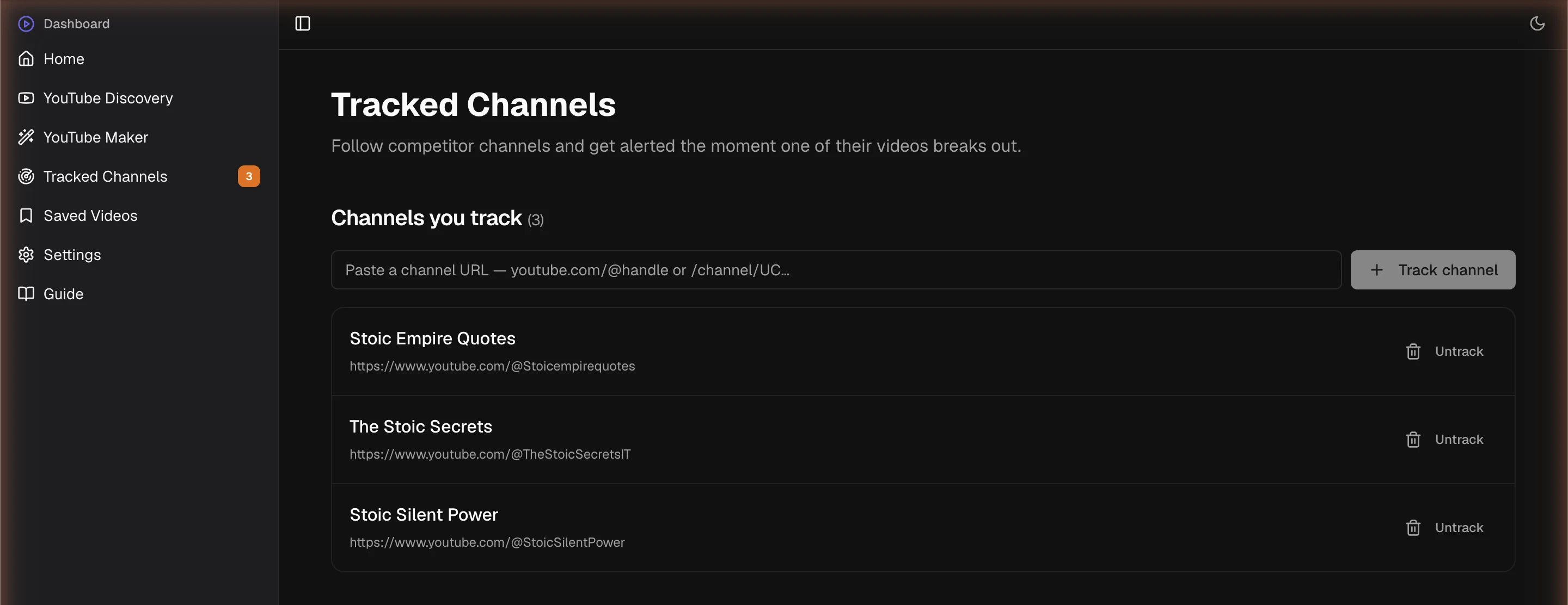
- 1Click Track on any result card to follow a channel.
- 2Manage the list here; paste-add by URL or untrack.
- 3A scan runs every 6 hours looking for breakouts.
Each alert links straight to the video with the multiplier baked in. Manage your list on the Tracked Channels page: paste-add by URL, or untrack.
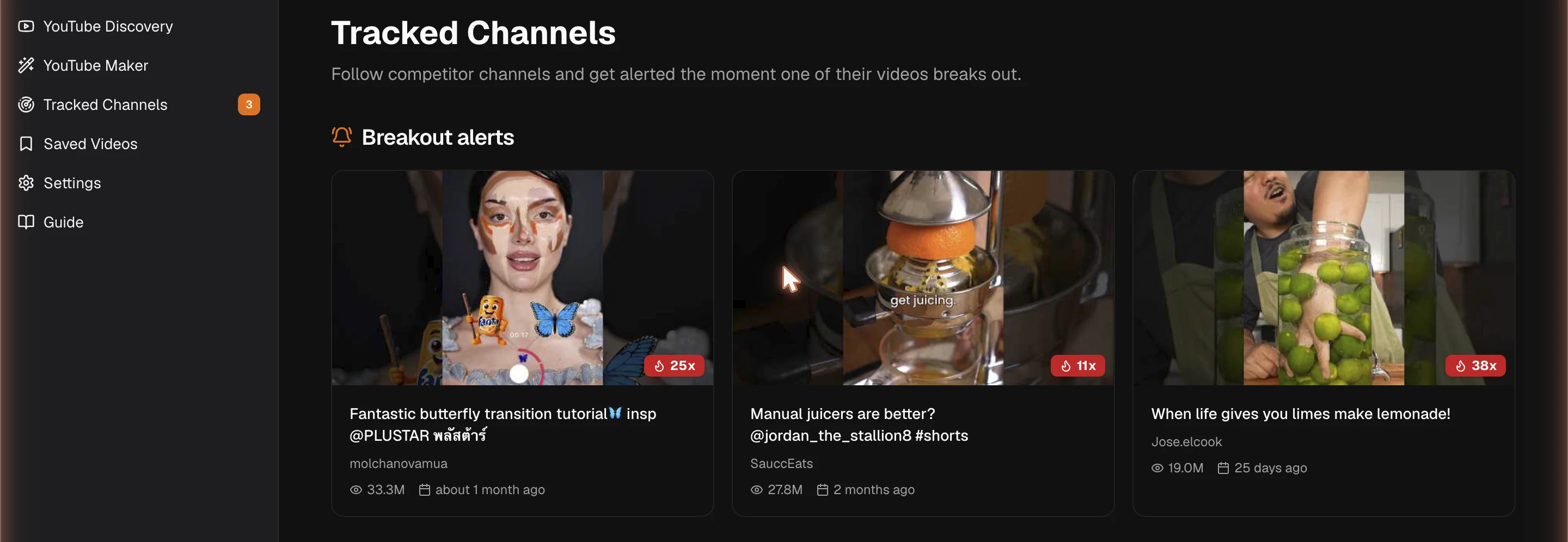
- 1Alerts appear when a tracked channel's recent video beats its baseline by ≥3×.
- 2Each alert links straight to the video with the multiplier shown.
- 3The sidebar shows an unseen-count badge.
Why this matters
Feature
Similar titles & thumbnails
From any card, Similar ▾ opens a menu. Use it to validatea concept: if you can find three or more outliers on the same idea, it’s probably real, not a fluke.
- Similar titles— an LLM extracts the title’s core idea (so clickbait phrasing doesn’t throw the search off), then finds other videos covering that concept.
- Similar thumbnails— image understanding describes the thumbnail’s visual style and surfaces look-alikes.
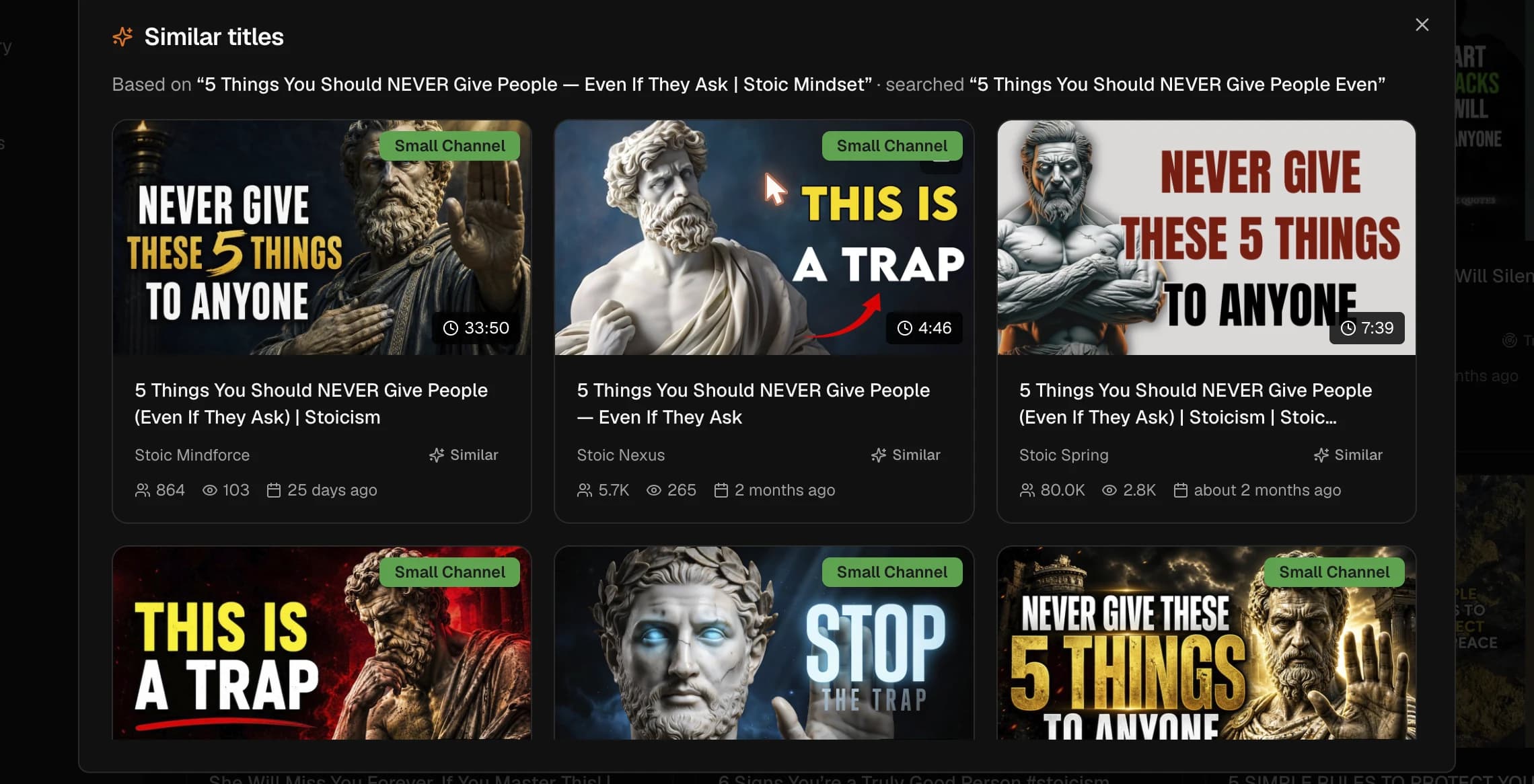
- 1On a card, open Similar ▾ → Similar titles.
- 2An LLM extracts the core idea so clickbait phrasing doesn't skew the search.
- 3Results are outlier-scored — 3+ matches means the idea is real.
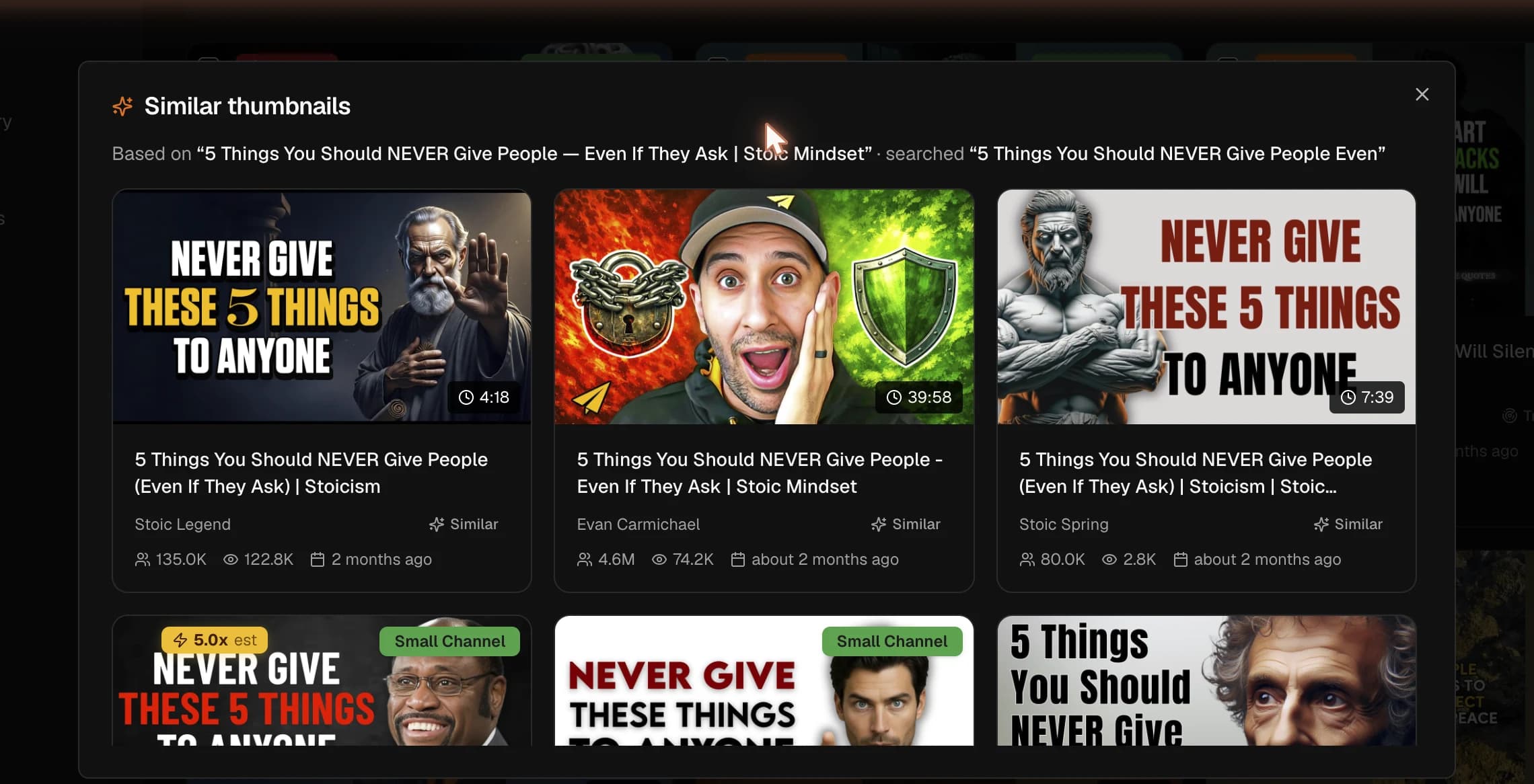
- 1Open Similar ▾ → Similar thumbnails on a card.
- 2Gemini Vision describes the thumbnail's visual style, then searches for it.
- 3From a result, use "Use thumbnail in Studio" to start a Thumbnail Studio project.
Why this matters
Feature
Thumbnail Studio
Generate thumbnails from a reference, a description, or a video title. Reach it from YouTube Maker’s Thumbnails stage, or jump straight in via Similar ▾ → Use thumbnail in Studioon any Discovery result — which seeds a fresh project with that thumbnail pre-loaded as a reference.
- Generate batches in seconds with Gemini.
- Refine in plain language (“make the text yellow”).
- Upscale to high resolution and download.
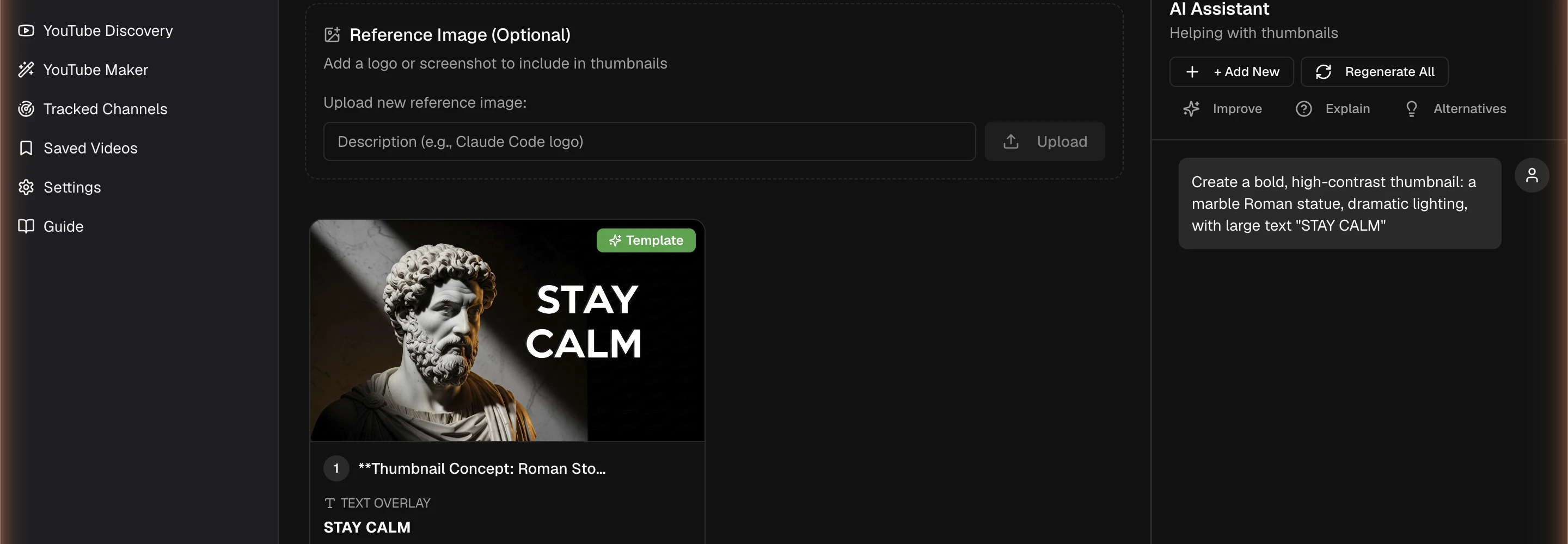
- 1Reach it from the Maker Thumbnails stage, or via "Use thumbnail in Studio" from Discovery.
- 2Describe the concept or upload a reference; Gemini generates batches.
- 3Refine in plain language ("make the text yellow") and upscale.
Why this matters
Feature
YouTube Maker
A guided creative path: pick a topic, generate hooks, pick one, write an intro, then titles, then thumbnails. Each stage builds on the last, with conversational refinement and undo/redo throughout.
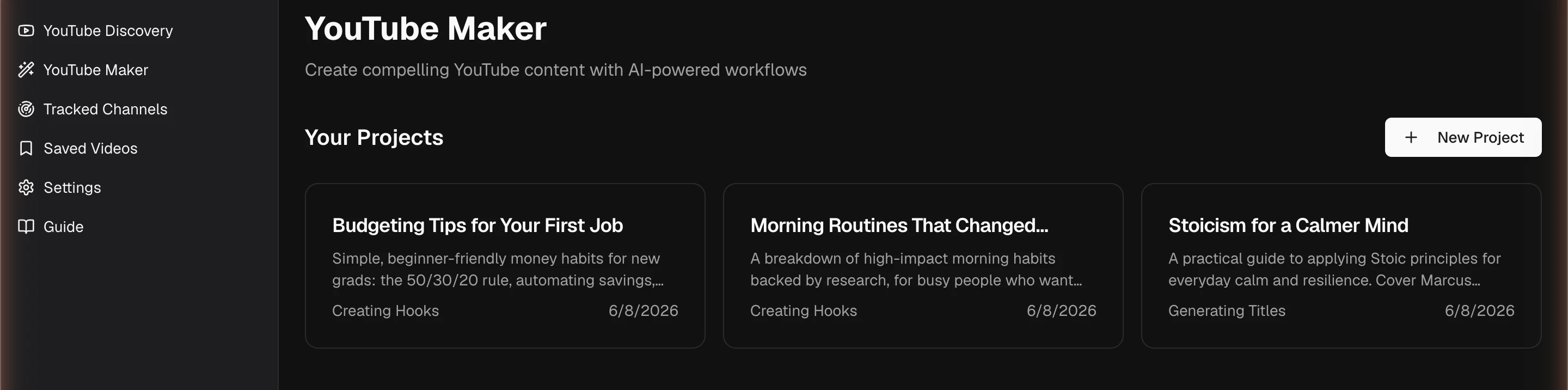
- 1Create a project from a topic.
- 2Each project remembers its current stage.
- 3Open one to continue where you left off.
The Creative Paths panel tracks progress and lets you jump between stages. You can override the system prompt for any stage in Settings.
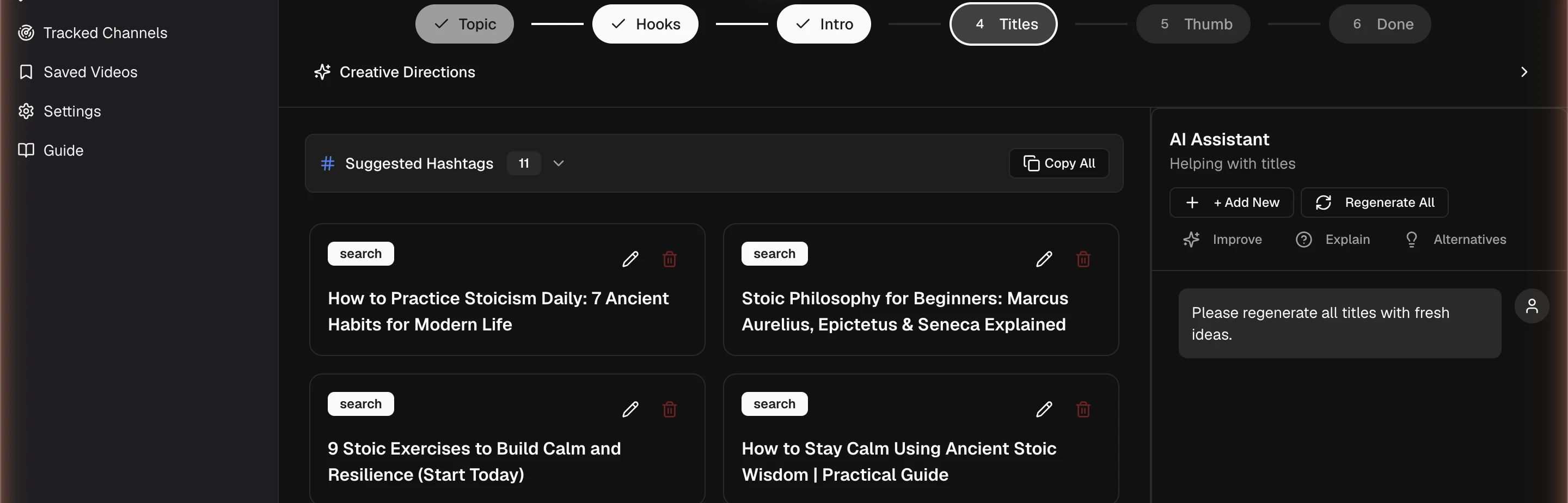
- 1Each stage builds on your previous picks (hook → intro → titles).
- 2Generate, refine conversationally, undo/redo.
- 3The Creative Paths panel lets you jump between stages.
Why this matters
Feature
Saved Videos
Save any video from Discovery with one click. With a RapidAPI key connected, we pull the full timestamped transcript — and your whole library becomes searchable across every transcript.
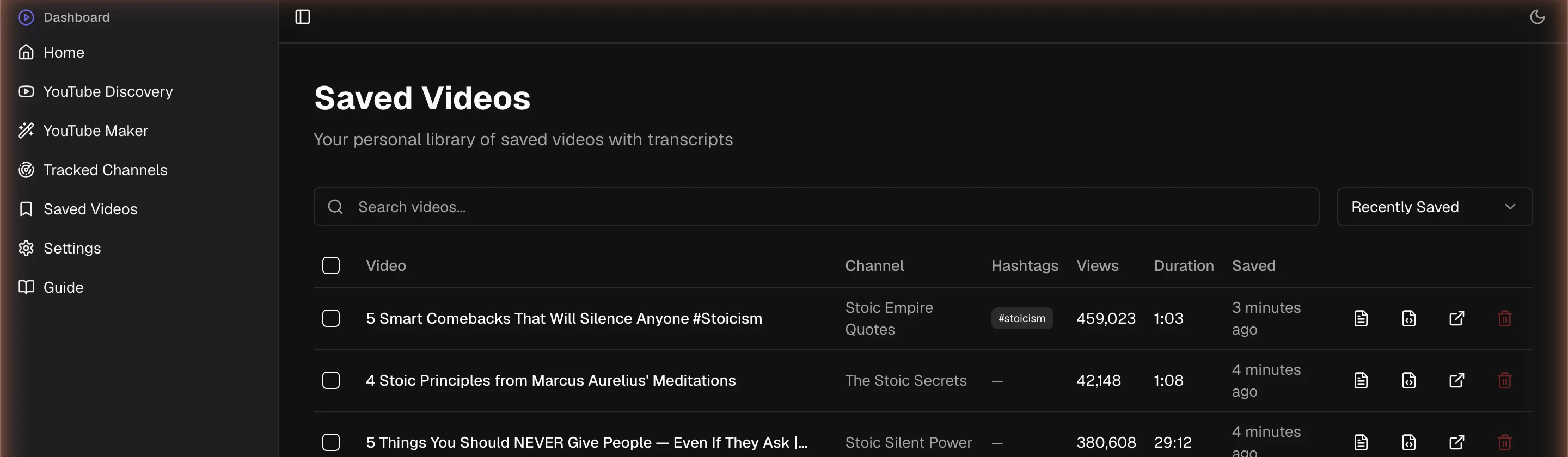
- 1Save any video from Discovery; we pull the full transcript (RapidAPI key).
- 2Search across all saved transcripts to find hooks and structures.
- 3Open transcripts feed straight into Maker when you script.
Why this matters
Put it together
Playbooks
A viral idea for my channel, fast
- Search your niche; Uploaded: Past month; sort by Velocity.
- Filter to 🔥 Breakouts only.
- Pick one ≥5× → Similar titles to confirm 3+ matches (a real concept, not a one-off).
Model a competitor's win
- Search the competitor’s channel name or paste their URL.
- Sort by outlier — their recent over-performers.
- Open a winner’s Similar titles + thumbnails, then use the Studio bridge to make your own version.
Build a swipe file for my niche
- Search broad; filter to Strong (5×+); sort by Outlier.
- Save the winners — we pull full transcripts.
- Search across saved transcripts later for specific hook structures.
Know the moment a competitor breaks out
- Find their videos in Discovery → click Track.
- Their next outlier appears in Tracked Channels within six hours.
- Click the alert to jump straight to the video.
Reference
Glossary
- Outlier— a video whose views significantly exceed its channel’s typical recent performance.
- Multiplier— views ÷ channel baseline. 10× means ten times the channel’s typical reach.
- Channel baseline— the median view count of a channel’s recent uploads. Resists the channel’s own past spikes; the “true” denominator.
- Subscriber proxy (est)— an estimate from subscriber count, used until a true baseline is cached. Fast, free, less precise.
- Velocity— average views per day since upload. Captures momentum right now in a way lifetime views can’t.
- Breakout (🔥)— recent (≤60 days) + high multiplier + strong velocity. The videos to act on quickly.
Reference